Blog
Best AI Workflow Automation Tools in 2026: Honest Comparison
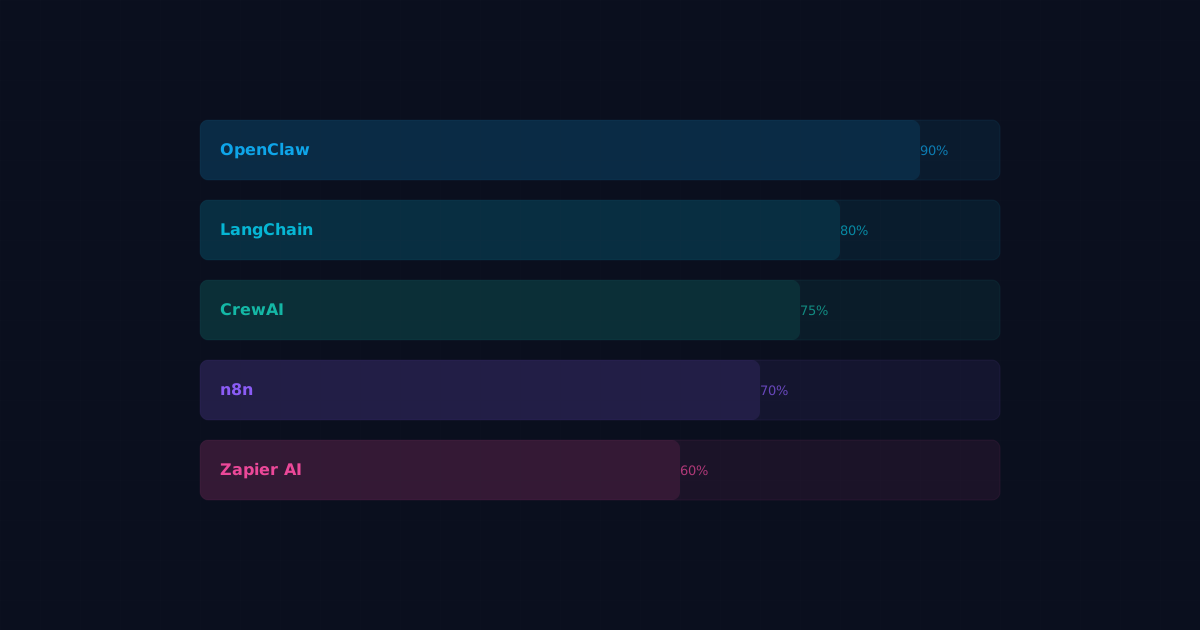
Picking the right AI workflow automation tool saves you months of wasted effort. The wrong choice means rewriting integrations, fighting limitations, and eventually migrating anyway. Here's an honest breakdown of the top options in 2026.
Quick Summary
If you want the short version:
- OpenClaw — best for persistent AI agents with memory, identity, and multi-agent orchestration
- n8n — best for visual workflow building with AI nodes bolted on
- LangChain/LangGraph — best for developers who want maximum control over agent logic
- CrewAI — best for role-based multi-agent collaboration on specific tasks
- AutoGen — best for research-oriented conversational agent systems
- Zapier AI — best for non-technical users who need simple AI-enhanced triggers
Now let's dig into each one.
1. OpenClaw
OpenClaw is a full-stack agent platform. It handles the complete lifecycle: identity (SOUL.md), memory (MEMORY.md), tool management (skills), scheduling (cron/heartbeat), and multi-agent orchestration.
What makes it different: Agents in OpenClaw have persistent identity and memory. They remember past conversations, learn preferences, and maintain context across sessions. Most other tools treat each run as isolated.
Strengths:
- Built-in memory system (daily logs, long-term memory, project tracking)
- Skill marketplace for plug-and-play tool integrations
- Multi-agent routing with orchestrator/specialist pattern
- Cron scheduling and heartbeat-based proactive behavior
- Works with Claude, GPT, Gemini, and local models
- Self-hosted, so your data stays on your infrastructure
Limitations:
- Steeper learning curve than visual builders
- Requires a server or VPS to run
- Smaller community compared to LangChain (growing fast, though)
Best for: Teams and individuals who want AI agents that act like persistent assistants rather than one-shot tools. Developers who prefer configuration over code.
Pricing: Open source. You pay for LLM API costs and hosting.
2. n8n
n8n is a visual workflow automation platform. It started as an open-source Zapier alternative and has added AI capabilities with dedicated LLM nodes.
Strengths:
- Drag-and-drop visual workflow editor
- 400+ native integrations
- Self-hosted or cloud options
- AI nodes for text generation, classification, and summarization
- Active community and extensive templates
Limitations:
- AI is an add-on, not the core architecture
- No persistent agent memory across workflow runs
- Complex agent logic requires workarounds
- Visual editor gets unwieldy for large workflows
Best for: Teams that already use workflow automation and want to add AI capabilities incrementally. Non-developers who prefer visual building.
Pricing: Free self-hosted. Cloud plans start at $24/month.
3. LangChain / LangGraph
LangChain is a Python/JavaScript framework for building LLM applications. LangGraph extends it with graph-based agent orchestration.
Strengths:
- Maximum flexibility and control
- Massive ecosystem of integrations
- LangGraph enables complex agent state machines
- LangSmith for debugging and monitoring
- Largest community in the AI agent space
Limitations:
- Requires significant coding ability
- Abstractions change frequently (breaking changes between versions)
- Over-engineered for simple use cases
- No built-in deployment or scheduling; you handle infrastructure yourself
Best for: Developers building custom AI applications who need fine-grained control over every aspect of agent behavior.
Pricing: Open source. LangSmith monitoring starts free, paid tiers for higher volume.
4. CrewAI
CrewAI focuses on multi-agent collaboration. You define agents with specific roles, assign them tasks, and CrewAI manages the coordination.
Strengths:
- Clean, intuitive API for multi-agent systems
- Role-based agent definition feels natural
- Built-in task delegation and result sharing
- Good documentation and examples
- Lower learning curve than LangChain for multi-agent setups
Limitations:
- Less flexible than LangChain for custom architectures
- Limited persistence between crew runs
- Smaller integration ecosystem
- Agent memory is basic compared to dedicated solutions
Best for: Teams that need multiple AI agents working together on structured tasks, like content production pipelines or research workflows.
Pricing: Open source core. Enterprise pricing for managed platform.
5. AutoGen (Microsoft)
AutoGen is Microsoft's framework for building multi-agent conversational systems.
Strengths:
- Strong support for agent-to-agent conversation
- Good for research and experimentation
- Code execution sandbox built in
- Supports human-in-the-loop patterns
- Backed by Microsoft Research
Limitations:
- More research-oriented than production-focused
- Documentation can be sparse for advanced features
- Less opinionated about deployment patterns
- Agent memory and persistence require custom implementation
Best for: Researchers and developers experimenting with conversational multi-agent systems. Teams already invested in the Microsoft ecosystem.
Pricing: Open source.
6. Zapier AI / Central
Zapier has added AI features including a natural language workflow builder and AI-powered actions within existing Zaps.
Strengths:
- Lowest barrier to entry
- Thousands of app integrations
- Natural language workflow creation
- No coding required
- Reliable infrastructure
Limitations:
- AI capabilities are surface-level
- No true autonomous agent behavior
- Expensive at scale (per-task pricing adds up)
- Limited customization
- Vendor lock-in
Best for: Non-technical users who need simple AI enhancements to existing automated workflows.
Pricing: Free tier available. Paid plans from $19.99/month. AI features on higher tiers.
Feature Comparison
Here's how these tools stack up across the features that matter most for AI workflow automation:
Persistent agent memory:
- OpenClaw: Yes (built-in, file-based)
- n8n: No (requires external storage)
- LangChain: Partial (requires custom setup)
- CrewAI: Basic
- AutoGen: Requires custom implementation
- Zapier: No
Multi-agent orchestration:
- OpenClaw: Yes (orchestrator pattern)
- n8n: No
- LangChain/LangGraph: Yes (graph-based)
- CrewAI: Yes (role-based)
- AutoGen: Yes (conversational)
- Zapier: No
Scheduling and triggers:
- OpenClaw: Yes (cron, heartbeat, webhook)
- n8n: Yes (cron, webhook, app triggers)
- LangChain: No (bring your own)
- CrewAI: No (bring your own)
- AutoGen: No (bring your own)
- Zapier: Yes (app triggers, schedule)
Self-hostable:
- OpenClaw: Yes
- n8n: Yes
- LangChain: Yes (it's a library)
- CrewAI: Yes
- AutoGen: Yes
- Zapier: No
Coding required:
- OpenClaw: Minimal (YAML/Markdown config)
- n8n: No (visual builder)
- LangChain: Yes (Python/JS)
- CrewAI: Yes (Python)
- AutoGen: Yes (Python)
- Zapier: No
How to Choose
Choose OpenClaw if you want agents that persist between sessions, remember context, and proactively handle tasks. Best for personal AI assistants, team automation, and multi-agent workflows where identity and memory matter.
Choose n8n if you already have workflow automation needs and want to add AI as one component. The visual builder makes it accessible without coding.
Choose LangChain if you're a developer building a custom AI application and need maximum control. You're comfortable managing your own infrastructure.
Choose CrewAI if your primary use case is multiple agents collaborating on structured tasks. The role-based model is intuitive for team-style automation.
Choose Zapier if you need dead-simple automation with some AI sprinkled in and don't want to touch code or manage servers.
What We Recommend
For most readers of this blog (people interested in building real AI agent systems), OpenClaw or LangChain will serve you best. OpenClaw if you want an opinionated, batteries-included platform. LangChain if you want a flexible toolkit and don't mind building the infrastructure yourself.
The honest truth: the best tool is the one you'll actually use consistently. Start with whichever matches your technical comfort level, build something that works, and upgrade later if you outgrow it.
FAQ
Which AI workflow automation tool is easiest to learn?
Zapier is the easiest, followed by n8n. Both have visual interfaces and require no coding. OpenClaw is next with its markdown/YAML configuration approach. LangChain and CrewAI require Python knowledge.Can I switch between tools later?
Partially. Your prompts, agent logic, and business rules transfer conceptually but not as direct code. Tool integrations usually need to be rebuilt. Memory and configuration formats differ between platforms. Plan for some migration work.Do these tools work with any LLM?
OpenClaw, LangChain, CrewAI, and AutoGen support multiple LLM providers (OpenAI, Anthropic, Google, local models). n8n supports OpenAI and a growing list of providers. Zapier primarily uses OpenAI.How much do AI workflow automation tools cost in total?
The tools themselves range from free (open source) to $20 to $100/month for cloud-hosted options. The bigger cost is LLM API usage: expect $10 to $200/month depending on volume. Self-hosting requires a VPS ($5 to $50/month).Can I use multiple tools together?
Yes. Some teams use n8n for simple trigger-based workflows and OpenClaw or LangChain for complex agent tasks. There's no rule saying you have to pick just one.Are open-source options as reliable as paid platforms?
For self-hosted tools, reliability depends on your infrastructure and maintenance. OpenClaw and n8n have strong track records for self-hosted reliability. Paid platforms like Zapier handle infrastructure for you but cost more and limit customization.Which tool is best for a solo developer or freelancer?
OpenClaw for a personal AI assistant that handles daily tasks. n8n if you prefer visual workflow building. Both are free to self-host and handle solo workloads comfortably on a $10/month VPS.Related posts
View allOpenClaw vs n8n: Which Automation Tool Is Better for AI Workflows?
April 8, 2026
A practical comparison of OpenClaw vs n8n, including workflow style, agent behavior, approvals, memory, and which one fits better for AI-driven operations.
AI Agent Runbook Template: How to Build Repeatable Agent Workflows
April 24, 2026
A practical AI agent runbook template for OpenClaw teams, including what to include, how to structure approvals and escalation, and how to turn one-off workflows into repeatable operations.
How to Install OpenClaw on Ubuntu
April 20, 2026
A practical guide to installing OpenClaw on Ubuntu, running onboarding, checking gateway health, and fixing the setup issues that trip up first-time installs.