Blog
AI Tools for Business Automation: A No-Nonsense Buyer's Guide for 2026
AI Tools for Business Automation: A No-Nonsense Buyer's Guide for 2026
Every SaaS company now slaps "AI-powered" on their marketing page. That makes choosing the right tool harder, not easier. This guide cuts through the noise and compares the tools that actually work for automating business operations in 2026.
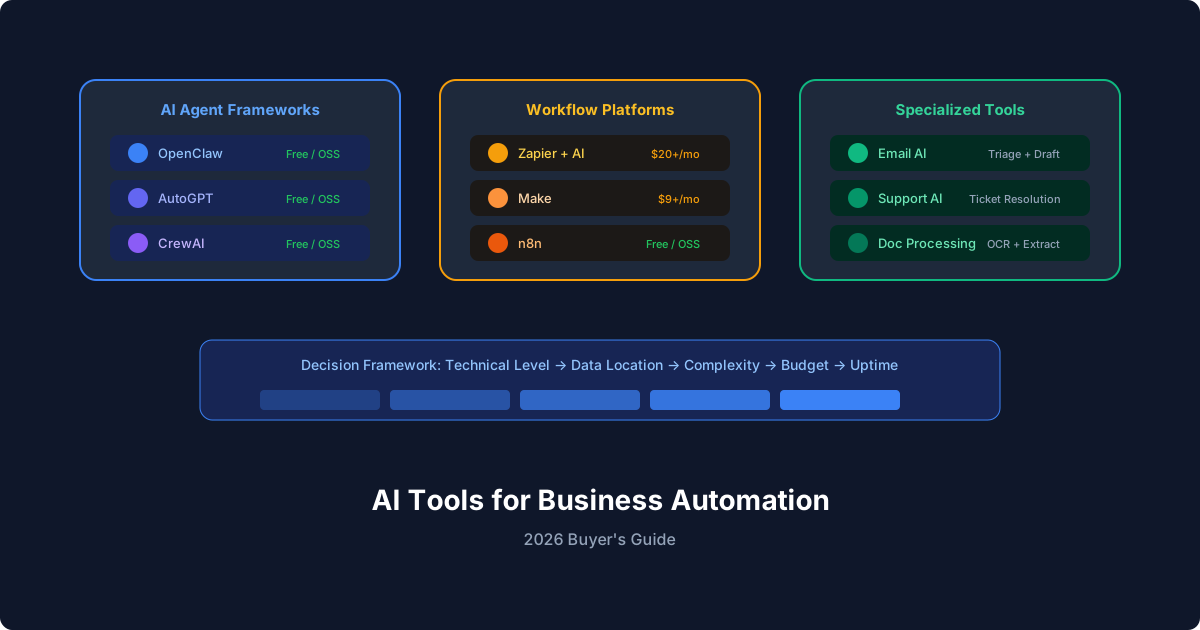
We'll cover three categories: AI agent frameworks (for building custom automations), AI-enhanced workflow platforms (drag-and-drop tools with AI features), and specialized AI automation tools (purpose-built for specific tasks).
Category 1: AI Agent Frameworks
These tools let you build custom AI agents that handle complex, multi-step business processes. You get maximum flexibility but need some technical comfort.
OpenClaw
Best for: Teams that want full control over their AI agents with zero vendor lock-in.
OpenClaw is an open-source AI agent framework that runs on your infrastructure. Agents are configured through markdown files (AGENTS.md for behavior, MEMORY.md for persistent context, HEARTBEAT.md for scheduled checks). It supports multiple AI models (Claude, GPT, Gemini) and includes built-in integrations for email, calendar, Slack, Telegram, and dozens of other tools through its skills system.
Strengths:
- Open source, self-hosted (your data stays on your servers)
- Model-agnostic (switch between Claude, GPT, Gemini without rewriting)
- Persistent memory across sessions
- Built-in cron scheduling and heartbeat polling
- Growing ecosystem of installable skills for specific integrations
- Active community and documentation at docs.openclaw.ai
Tradeoffs:
- Requires a server or VPS to run (not a managed SaaS)
- Configuration is done through text files, not a visual editor
- Smaller ecosystem than enterprise platforms
Pricing: Free (open source). You pay for AI model API costs and your server.
Sample configuration:
# AGENTS.md - Sales Operations Agent

## Responsibilities
- Monitor CRM for new leads
- Enrich lead data using web research
- Score leads based on ICP fit
- Route qualified leads to sales reps
- Generate weekly pipeline report

## Escalation
- Enterprise leads (>500 employees): notify VP Sales immediately
- Any lead from a competitor's domain: flag for review
AutoGPT
Best for: Experimentation and single-task automation.
AutoGPT pioneered the autonomous AI agent concept. It breaks down goals into tasks and executes them sequentially. Good for one-off research and analysis tasks, less suited for ongoing business process automation.
Strengths:
- Large community, lots of tutorials
- Good at open-ended research tasks
- Web browsing and code execution built in
Tradeoffs:
- Token consumption can spiral on complex tasks
- No persistent memory between runs (without custom setup)
- Less reliable for production business workflows
- Limited scheduling and monitoring capabilities
Pricing: Free (open source). API costs vary based on usage.
CrewAI
Best for: Multi-agent workflows where different "roles" collaborate.
CrewAI lets you define teams of specialized agents that work together. A "researcher" agent feeds findings to an "analyst" agent, which passes conclusions to a "writer" agent. It's Python-based and good for complex workflows with clear handoff points.
Strengths:
- Clean role-based agent design
- Good inter-agent communication
- Python ecosystem access
- Active development
Tradeoffs:
- Requires Python knowledge
- No built-in scheduling or deployment solution
- Debugging multi-agent interactions can be tricky
- Still maturing for production use
Pricing: Free (open source). API costs apply.
Category 2: AI-Enhanced Workflow Platforms
These are traditional automation platforms that have added AI capabilities. Lower learning curve, less flexibility.
Zapier with AI
Zapier's AI features include natural language automation building, AI-powered data transformation, and integration with AI models. Good for simple automations between SaaS tools. Breaks down at complex logic and multi-step reasoning.
Best for: Non-technical users automating SaaS-to-SaaS workflows.
Pricing: Free tier available. Paid plans from $19.99/month.
Make (formerly Integromat)
Make offers visual workflow building with AI modules. More powerful than Zapier for complex branching logic, with better error handling and data transformation. The visual builder is genuinely useful for understanding complex workflows.
Best for: Teams that need visual workflow building with moderate complexity.
Pricing: Free tier available. Paid from $9/month.
n8n
Self-hosted workflow automation with AI node support. Similar visual approach to Make but runs on your servers. Good middle ground between full agent frameworks and managed platforms.
Best for: Teams that want visual workflow building with self-hosting.
Pricing: Free (open source self-hosted). Cloud from $20/month.
Category 3: Specialized AI Automation Tools
These handle one category of business automation really well.
For Email: SaneBox, Superhuman
AI-powered email triage and prioritization. Good at the specific problem of email overload but limited to that single use case.
For Customer Support: Intercom Fin, Zendesk AI
AI agents that handle first-line customer support. Trained on your knowledge base, they resolve common questions and escalate complex issues. High ROI if support volume is your bottleneck.
For Data Processing: Nanonets, Rossum
Document extraction and processing. Read invoices, receipts, contracts, and forms. Extract structured data without manual entry. Strong in accounts payable and compliance workflows.
How to Choose: Decision Framework
Ask these five questions:
1. How technical is your team?
- Non-technical → Zapier or Make
- Some technical comfort → n8n or CrewAI
- Technical and wants full control → OpenClaw
2. Where does your data live?
- All in SaaS tools → Zapier or Make connect natively
- On-premise or privacy-sensitive → OpenClaw or n8n (self-hosted)
- Mix of both → OpenClaw with skill integrations
3. How complex are your workflows?
- Simple A-to-B connections → Zapier
- Multi-step with branching → Make or n8n
- Requires reasoning and judgment → OpenClaw or CrewAI
4. What's your budget?
- $0 → OpenClaw (open source) + API costs
- $20 to $100/month → n8n cloud or Make
- $100+/month → Enterprise platforms
5. Do you need it running 24/7?
- Occasional tasks → Any tool works
- Always-on monitoring → OpenClaw heartbeat/cron or dedicated platform
Setting Up Your First AI Automation
Regardless of which tool you choose, follow this process:
1. Document the process manually. Write down every step a human takes, every decision point, every exception. You can't automate what you haven't defined.
2. Identify the 80/20. Which 20% of the process takes 80% of the time? Automate that part first.
3. Start with a human in the loop. Have the AI agent do the work but require human approval before acting. Remove the approval gate once you trust the output.
4. Measure before and after. Track time spent, error rate, and throughput before automation. Measure again after 30 days.
5. Iterate based on failures. Every mistake is a training opportunity. Update your agent's configuration, add edge case handling, refine the instructions.
With OpenClaw, this process looks like:
# Install
npm install -g openclaw
openclaw init

# Configure your agent
nano AGENTS.md  # Define behavior and rules

# Set up scheduled execution
nano HEARTBEAT.md  # What to check on each polling cycle

# Start with manual runs to validate
openclaw start
Check the OpenClaw documentation for detailed setup guides, or browse the GitHub repository for examples and community skills.
Frequently Asked Questions
What's the best AI tool for business automation in 2026?
It depends on your technical level and use case. For maximum flexibility and data privacy, OpenClaw (open source, self-hosted) is the strongest option. For non-technical teams connecting SaaS tools, Zapier with AI features is the easiest starting point. For visual workflow building with self-hosting, n8n hits a good middle ground.Can AI automation tools replace employees?
They're better at augmenting employees than replacing them. AI handles repetitive, structured tasks (data entry, email sorting, report generation) so people can focus on work that requires judgment, creativity, and relationships. Most companies see AI automation shifting employee time from busywork to higher-value activities.How much do AI automation tools cost?
Range from free (OpenClaw, n8n self-hosted) to hundreds per month (enterprise platforms). The main variable cost is AI model API usage, typically $10 to $100/month for moderate automation workloads. Total cost of ownership should factor in setup time and ongoing maintenance.Are AI automation tools secure?
Self-hosted tools (OpenClaw, n8n) keep all data on your infrastructure, giving you full control. Cloud platforms vary: check their SOC 2 compliance, data processing agreements, and whether they train models on your data. For regulated industries, self-hosted is usually the safer choice.How long does it take to see ROI from AI automation?
Most teams report measurable time savings within 2 to 4 weeks for well-chosen automation targets. Full ROI (accounting for setup time and learning curve) typically arrives within 2 to 3 months. The key is starting with a high-frequency, time-consuming process rather than an occasional one.Can I use multiple AI automation tools together?
Yes. Many teams use a workflow platform (Zapier or Make) for simple SaaS connections alongside an agent framework (OpenClaw) for complex reasoning tasks. The tools aren't mutually exclusive. Use the right tool for each job.Do I need to know how to code to use AI automation tools?
For platforms like Zapier and Make, no coding is needed. For OpenClaw, you write configuration in markdown (plain English instructions), which doesn't require programming knowledge but does require comfort with text files and the command line. For CrewAI, Python knowledge is necessary.Related posts
View allAI Agent Runbook Template: How to Build Repeatable Agent Workflows
April 24, 2026
A practical AI agent runbook template for OpenClaw teams, including what to include, how to structure approvals and escalation, and how to turn one-off workflows into repeatable operations.
How to Install OpenClaw on Ubuntu
April 20, 2026
A practical guide to installing OpenClaw on Ubuntu, running onboarding, checking gateway health, and fixing the setup issues that trip up first-time installs.
OpenClaw Mac Mini Setup Guide: How to Run an Always-On Agent at Home
April 20, 2026
A practical guide to setting up OpenClaw on a Mac Mini, installing the gateway daemon, keeping it stable, and turning it into a reliable always-on home agent box.