Blog
How to Build an OpenClaw Plugin: Custom Tools, Manifest, Install, and Restart
A practical guide to building OpenClaw plugins: what to build, how the manifest works, how to register custom tools, and how to install and test your plugin.
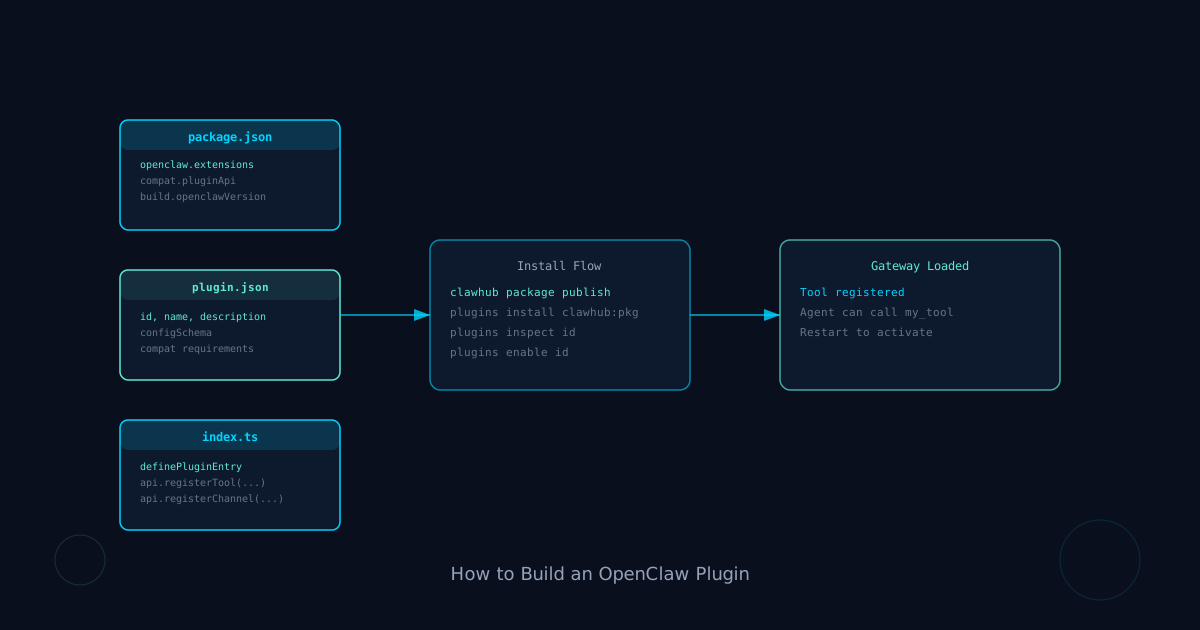
If you want to add new capabilities to OpenClaw that go beyond what a skill can do, you want a plugin. The short version: create a package with an openclaw.plugin.json manifest and an entry point that calls api.registerTool(...), publish it to ClawHub or npm, and install with openclaw plugins install <package>.
That is the minimal path.
This guide walks through why plugins exist, how they differ from skills, which type of plugin to build for your use case, how the manifest works, and what a complete tool plugin looks like from start to first install.
If you are working with skills for the first time, read how to add and use skills in OpenClaw and the ClawHub guide first. If you already understand the skill layer and want to extend OpenClaw itself, keep reading.
Skills vs plugins: what is the difference?
The practical distinction is this:
A skill teaches an agent how to use a tool or follow a workflow. It is a Markdown file (or folder with a SKILL.md) that tells the agent what to do, when, and how. Skills operate at the instruction level.
A plugin extends what OCPlatform itself can load and run. It is a Node.js package with a manifest and TypeScript entry point. Plugins operate at the runtime level.
If you want the agent to follow a repeatable research workflow, write a skill. If you want to give OpenClaw a new channel, a new model provider, a new tool the agent can call, or a new media capability, write a plugin.
The docs put it clearly: plugins extend OpenClaw with channels, model providers, speech, realtime transcription, image generation, web fetch, agent tools, and more.
Which plugin type should you build?
There are three main types. Choose before you write a line of code.
Channel plugin: Connects OpenClaw to a new messaging platform. Discord, IRC, a custom webhook. Use when you want OCPlatform to send and receive messages through a platform it does not support yet.
Provider plugin: Adds a model provider, CLI backend, speech, image generation, or other media capability. Use when you want OpenClaw to use a model or service that is not bundled.
Tool or hook plugin: Registers new agent tools, event hooks, or HTTP routes. Use when you want to add a specific callable action to OpenClaw that agents can invoke. This is the most common starting point for developers building custom capabilities.
Step 1: Set up the package
You need Node >= 22 and a package manager. The plugin is a standard npm/ESM package.
Create a directory and set up package.json:
{
  "name": "@myorg/openclaw-my-plugin",
  "version": "1.0.0",
  "type": "module",
  "openclaw": {
    "extensions": ["./index.ts"],
    "compat": {
      "pluginApi": ">=2026.3.24-beta.2",
      "minGatewayVersion": "2026.3.24-beta.2"
    },
    "build": {
      "openclawVersion": "2026.3.24-beta.2",
      "pluginSdkVersion": "2026.3.24-beta.2"
    }
  }
}
The openclaw.extensions field points OpenClaw to the entry point. The compat section declares the minimum Gateway version your plugin requires. This is how OpenClaw knows whether a given install can actually run your plugin.
Step 2: Write the manifest
Every plugin needs an openclaw.plugin.json manifest, even if it has no config.
{
  "id": "my-plugin",
  "name": "My Plugin",
  "description": "Adds a custom tool to OpenClaw",
  "configSchema": {
    "type": "object",
    "additionalProperties": false
  }
}
The id must be unique. The configSchema is required but can be an empty object schema if your plugin has no config. This is what OpenClaw uses to validate config before install.
If the config is invalid at install time, plugins install fails closed and tells you to run openclaw doctor --fix first.
Step 3: Write the entry point
Create index.ts at the root of your package.
import { definePluginEntry } from "openclaw/plugin-sdk/plugin-entry";
import { Type } from "@sinclair/typebox";

export default definePluginEntry({
  id: "my-plugin",
  name: "My Plugin",
  description: "Adds a custom tool to OpenClaw",
  register(api) {
    api.registerTool({
      name: "my_tool",
      description: "Runs a custom operation",
      parameters: Type.Object({
        input: Type.String({ description: "The input to process" }),
      }),
      async execute(_id, params) {
        const result = processInput(params.input);
        return {
          content: [{ type: "text", text: result }],
        };
      },
    });
  },
});
definePluginEntry is the registration function for non-channel plugins. The register(api) callback is where you declare capabilities. The api object gives you access to:
api.registerTool(...)for agent toolsapi.registerProvider(...)for model or media providersapi.registerChannel(...)for messaging channelsapi.registerHook(...)for event hooksapi.registerCommand(...)for custom slash commands
A single plugin can register multiple capabilities. A plugin that adds a tool and an HTTP route is perfectly fine.
Step 4: What good tool registration looks like
The tool contract matters more than most developers expect. Agents call tools by reading their descriptions and deciding when to use them. Vague descriptions lead to wrong calls or missed opportunities.
A few rules:
- Write the description as a plain-English sentence starting with a verb: "Searches the repository for files matching a pattern."
- Keep parameter descriptions short but precise. They become part of the tool's interface.
- Return
content: [{ type: "text", text: "..." }]for text output. The content array format is the standard OCPlatform tool result shape. - Handle errors by returning a result with a clear message. Do not throw unhandled exceptions.
api.registerTool({
  name: "repo_search",
  description: "Searches the repository for files matching a pattern.",
  parameters: Type.Object({
    pattern: Type.String({ description: "Glob or regex pattern to match" }),
    caseSensitive: Type.Optional(Type.Boolean()),
  }),
  async execute(_id, params) {
    const matches = await searchRepo(params.pattern, params.caseSensitive);
    if (!matches.length) {
      return { content: [{ type: "text", text: "No matches found." }] };
    }
    return {
      content: [{ type: "text", text: matches.join("\n") }],
    };
  },
});
Step 5: Test locally
For in-repo plugins, place the plugin under the bundled plugin workspace tree. OpenClaw discovers them automatically.
pnpm test -- <bundled-plugin-root>/my-plugin/For third-party plugins, test before publishing:
clawhub package publish your-org/your-plugin --dry-runThe dry run validates manifest, compat fields, and the build output without actually publishing.
Step 6: Publish to ClawHub
ClawHub is the official registry for OpenClaw plugins and skills. Publishing there makes your plugin discoverable with openclaw plugins install (which checks ClawHub before npm by default).
clawhub package publish your-org/your-pluginAfter publishing, anyone can install with:
openclaw plugins install clawhub:@myorg/openclaw-my-pluginYou can also push to npm. OCPlatform falls back to npm if ClawHub does not have the package:
openclaw plugins install @myorg/openclaw-my-pluginStep 7: Install and restart
After publishing, install the plugin on a gateway:
openclaw plugins install <package>Inspect what got installed:
openclaw plugins inspect my-plugin
openclaw plugins list --verbose
If you need to enable a plugin that shipped disabled:
openclaw plugins enable my-pluginRestart the gateway after install to load the new plugin. OpenClaw needs to load the extension at startup.
Updating and pinning versions
Keep plugin versions explicit. Bare package names install the latest stable track. To pin a specific version:
openclaw plugins install @myorg/openclaw-my-plugin@1.2.3ClawHub installs with an explicit locator:
openclaw plugins install clawhub:@myorg/openclaw-my-plugin@1.2.3To update:
openclaw plugins update my-plugin
openclaw plugins update --all
The --force flag reinstalls an already-installed plugin from a new local path or archive:
openclaw plugins install ./path-to-local-plugin --forceWhat makes a good plugin vs a bad one
A well-built plugin:
- Does one clear job and does it well
- Has a manifest with accurate metadata and a real config schema
- Returns consistent result shapes from every tool
- Handles errors gracefully without crashing the gateway
- Has compat fields set correctly so it fails on incompatible installs
A poorly built plugin:
- Registers tools with vague descriptions that agents use incorrectly
- Has a missing or empty manifest that breaks install validation
- Throws unhandled exceptions on unexpected input
- Does not declare minimum gateway version compatibility
The docs note that OpenClaw treats third-party plugin installs like running code. The same caution applies to building plugins: a plugin runs inside the gateway, not sandboxed. Bugs in your plugin can affect the gateway itself.
FAQ
Can a plugin register more than one tool?
Yes. Call api.registerTool(...) multiple times inside the register(api) callback. A single plugin can register as many tools, hooks, or commands as needed.
Do I need to restart the gateway after every update?
Yes. Plugin changes take effect after gateway restart. Install, enable (if needed), then restart.
Can I build a plugin that adds a new slash command?
Yes. Use api.registerCommand(...) in the register callback. Custom slash commands appear in the gateway's command surface once the plugin is loaded.
What is the difference between ClawHub skills and ClawHub plugins?
Skills are Markdown-based workflow instructions for agents. Plugins are Node.js packages that extend OpenClaw's runtime capabilities. Both live on ClawHub, but they install differently. Use openclaw skills install for skills and openclaw plugins install for plugins.
Is there a way to build a plugin that only applies to specific agents?
Plugins load at the gateway level, not per-agent. For per-agent tool scoping, use skill allowlists. Plugins affect all agents on that gateway.
How do I debug a plugin that isn't loading?
Run openclaw plugins inspect my-plugin to check the plugin state, and openclaw plugins doctor for broader gateway health. Check gateway logs for load errors after restart.
Can I publish a plugin that bundles with OCPlatform rather than requiring third-party install?
In-repo plugins placed under the bundled plugin workspace tree are discovered automatically and do not need to be published or installed separately. This is the right choice for plugins you want to ship alongside a custom OpenClaw fork or local deployment.
For more on extending OpenClaw with skills and discovering what is available in ClawHub, read how to add and use skills in OCPlatform and the ClawHub guide. For the full plugin reference, see the OpenClaw plugin docs and the building plugins guide.